DPAD_Direct_Access role on My DataLake Services
The DPAD_Direct_Access role provides access to Digital Twin data through the HDA service. On My DataLake Services, this role is handled differently from standard roles.
You cannot request, approve, or modify the DPAD_Direct_Access role directly in My DataLake Services. The role is managed externally in IAM DESP and is constantly synchronized with My DataLake Services.
Where the role is visible
If your user account already has the DPAD_Direct_Access role, it is displayed in the Active roles tab.
To verify whether the role is assigned to your account, open My DataLake Services and go to:
Home > Active roles
The role is shown under the hda service as an external access role.
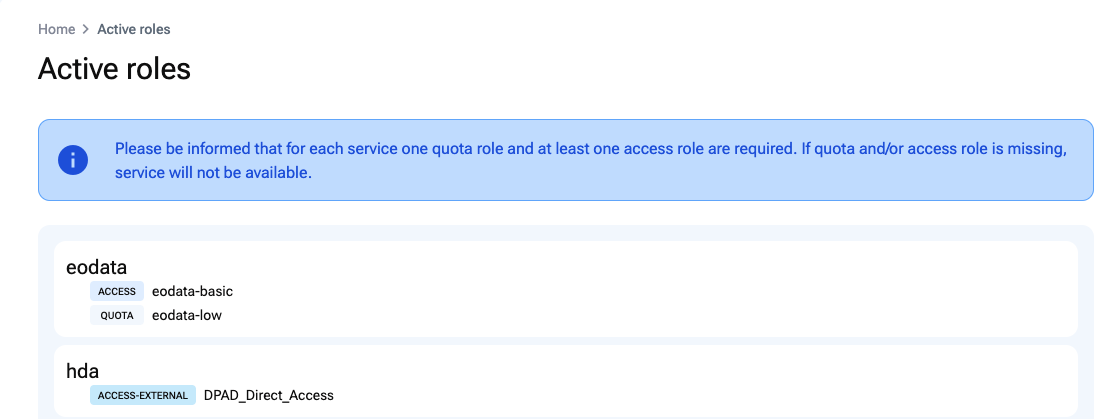
The DPAD_Direct_Access role visible in the Active roles tab.
The Active roles page also shows a notice explaining that each service requires one quota role and at least one access role. If a required quota or access role is missing, the service will not be available.
Using DPAD_Direct_Access with a Service Account
The DPAD_Direct_Access role can be used when creating a Service Account, but only if the role is already available for your user account.
During Service Account creation, the role appears in the service selection step.
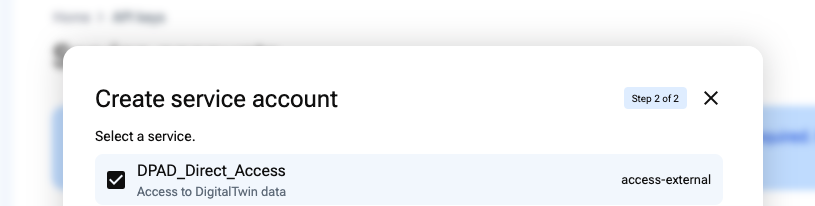
Selecting the DPAD_Direct_Access role while creating a Service Account.
Select DPAD_Direct_Access if the Service Account needs access to Digital Twin data.
Limitations
The DPAD_Direct_Access role has the following limitations:
You cannot request this role from My DataLake Services.
You cannot assign this role to yourself from My DataLake Services.
The role is managed in IAM DESP.
The role is synchronized automatically into My DataLake Services.
The role can only be selected for a Service Account if it is already available for your user account.
The role is intended for Service Account usage, especially for machine-to-machine access to Digital Twin data.
What happens when the role changes
If the DPAD_Direct_Access role is added to or removed from your account in IAM DESP, the change is synchronized with My DataLake Services.
As a result:
If the role is assigned to you in IAM DESP, it becomes visible in My DataLake Services.
If the role is removed from your account in IAM DESP, it is also removed from your available roles in My DataLake Services.
If a Service Account uses this role, access depends on whether the corresponding user still has the role assigned externally.
What to do if the role is missing
If you expect to use DPAD_Direct_Access but it is not visible in Active roles, contact the team responsible for access management in IAM DESP.
The role cannot be requested from the My DataLake Services interface.