Understanding available flavors in Islet OpenStack
Islet OpenStack provides several virtual machine (VM) flavors. A flavor defines the virtual CPUs (vCPUs), RAM, and local disk available to a VM. This article shows how to view, compare, and choose a flavor.
Available flavors can differ by Islet site and project. Check Horizon or run openstack flavor list to see the current list for your project.
Prerequisites
No. 1 Access to an active Islet OpenStack project
You need an active Islet project on the selected site. If your Islet access and quota roles are not active, follow How to request roles for Islet service on My DataLake Services. If the roles are active but you do not have a project, follow How to create Islet projects on My DataLake Services. Open Horizon for the selected site and select the project.
No. 2 Project quota
Use Dashboard Overview Project Quotas And Flavors Limits to check the project quota. In Horizon, open Compute → Overview. Record the remaining number of instances, vCPUs, and RAM.
No. 3 OpenStack CLI access (optional)
The CLI method is optional. To use it, download and activate the OpenStack RC file as described in How to activate OpenStack CLI access to the cloud. Keep the authenticated terminal open for the selected project.
Viewing flavors in Horizon
Log in to Horizon for the selected Islet site.
Select the OpenStack Project.
Open Project → Compute → Instances.
Click Launch Instance.
Open the Flavor step. It lists the flavors available to the project.
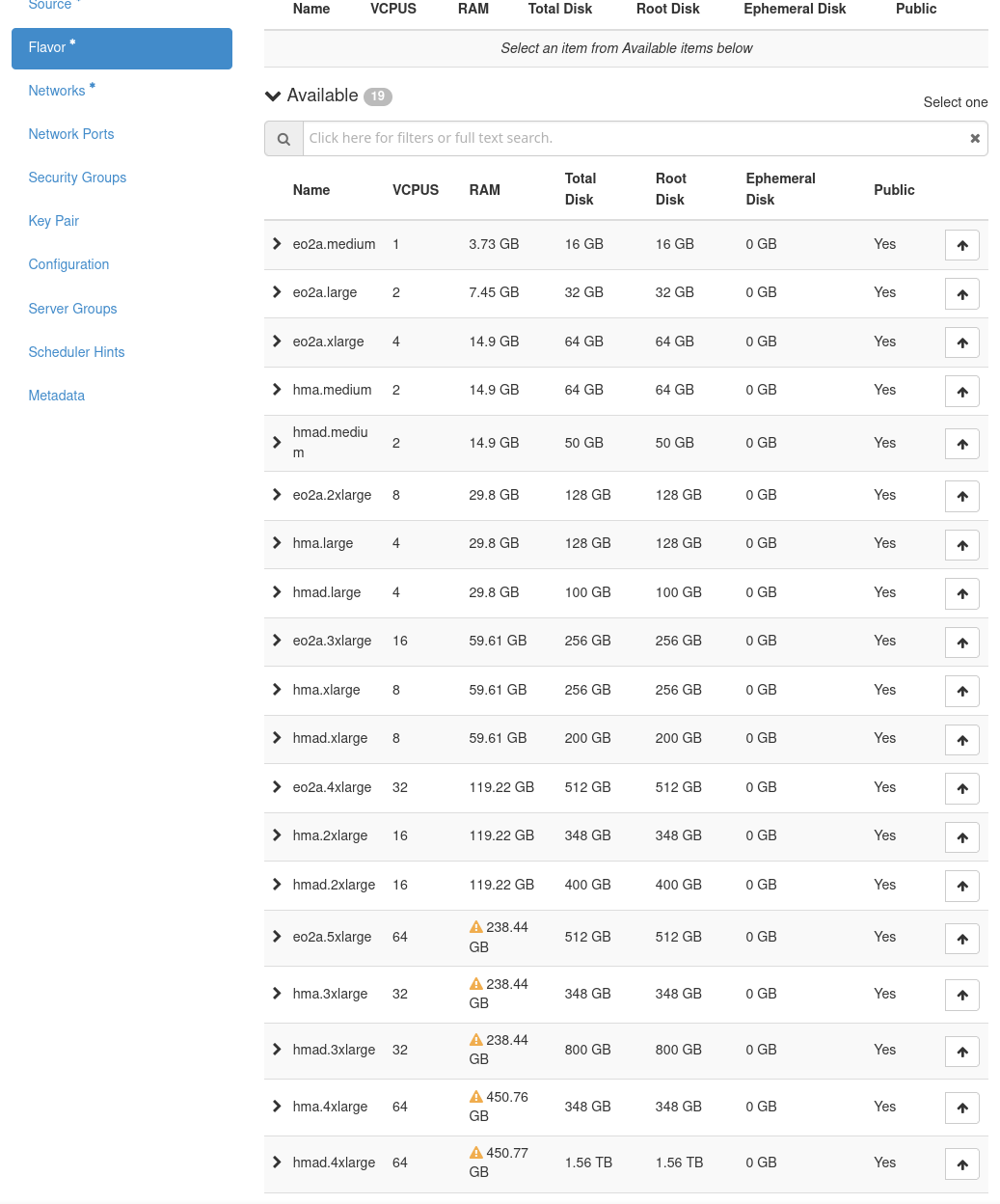
Flavors available to the selected project in the Horizon launch dialog.
The table lists the vCPUs, RAM, root disk, ephemeral disk, and visibility of each flavor. Public means that the flavor is generally visible to projects. It does not give the VM a public IP address. A warning symbol means that the flavor may exceed the project quota or may be temporarily unavailable.
Check the quota impact
Expand a flavor row before selecting it. Horizon shows how the flavor affects the remaining quota. In this example, the project has enough quota for the flavor:
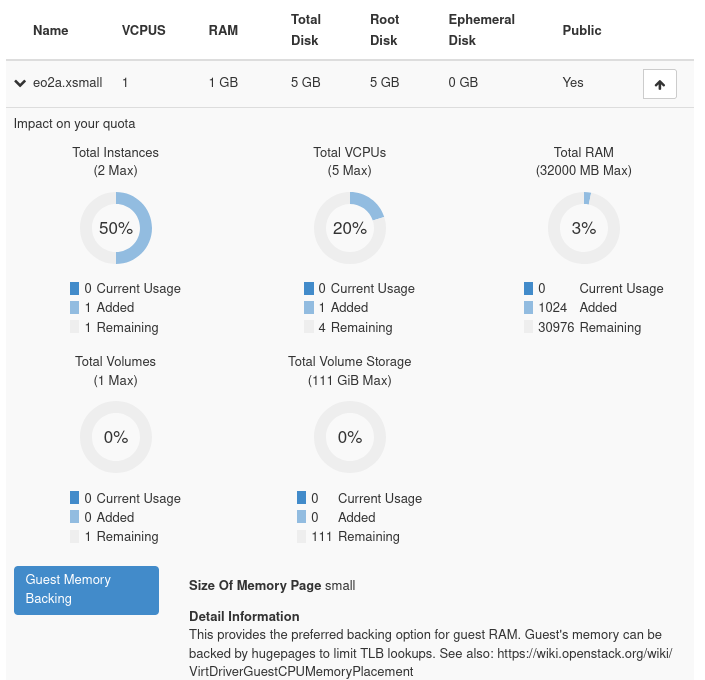
Quota impact of an available flavor.
A yellow warning triangle marks a flavor that cannot be selected. Expand the row to see the reason:
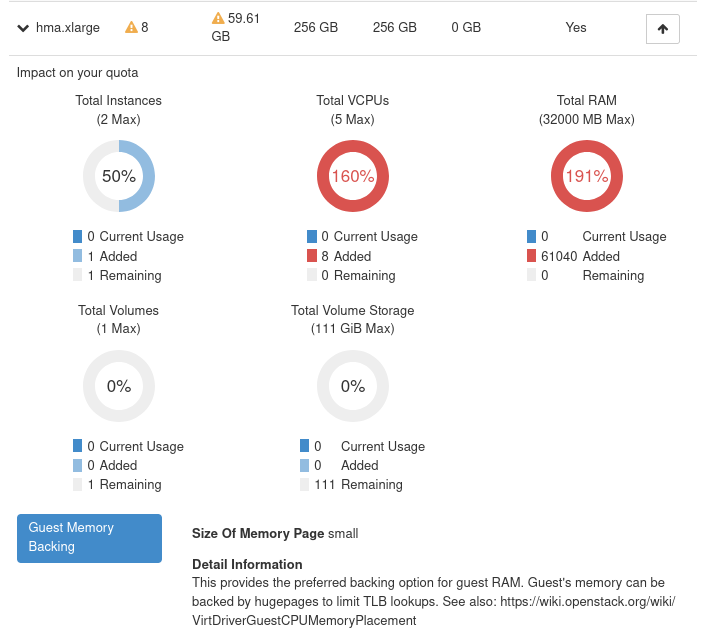
Reason why the flavor cannot be selected.
Viewing flavors with the OpenStack CLI
Open the authenticated terminal prepared in the prerequisites. Run this command to list the flavors for the selected project:
openstack flavor list
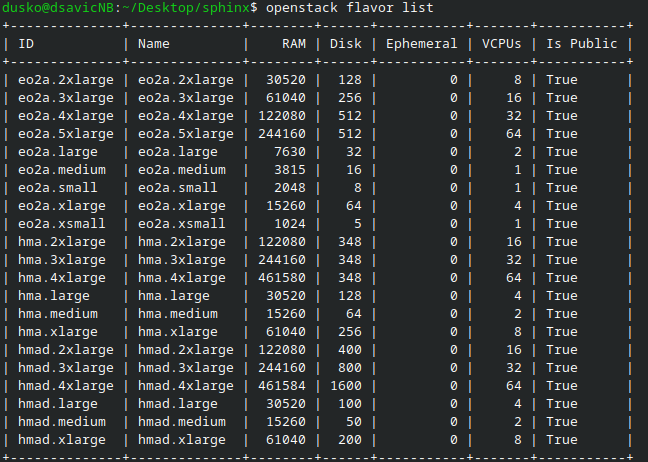
Flavor names and resource values returned for the selected OpenStack project.
Run this command to inspect the eo2a.large flavor:
openstack flavor show eo2a.large
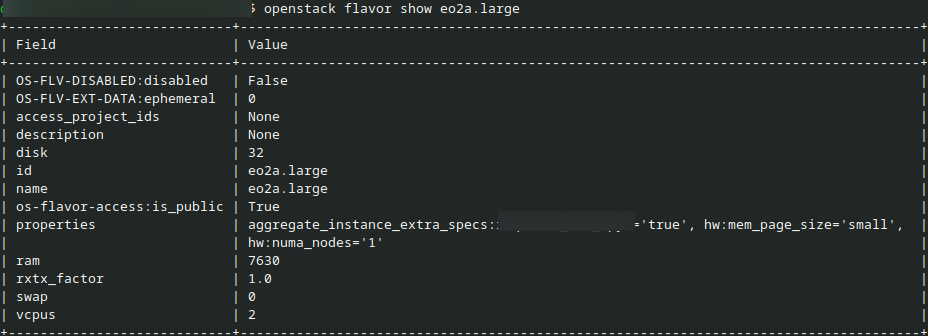
Details of the eo2a.large flavor.
The command shows the current vCPUs, RAM, disk, visibility, and properties of the flavor. It does not show how the flavor would affect the remaining project quota. Check the quota impact in Horizon.
Flavor definitions can change. Run openstack flavor show to confirm the current values instead of relying on a saved screenshot.
Reading a flavor name
Flavor names in Islet OpenStack usually use the form FAMILY.SIZE. For example, eo2a.large contains:
- eo2a
The flavor family. It identifies the balance of compute, memory, and disk resources.
- large
The size within the family. Other sizes include medium, xlarge, 2xlarge, and larger variants.
Size names apply only within a family. A large flavor in one family may have different RAM or disk than a large flavor in another family. Compare the vCPU, RAM, and disk values before making a selection.
Choosing the right flavor
Compare these properties before selecting a flavor:
vCPUs and RAM – Choose enough resources for the workload. Make sure that the project has enough remaining quota.
Root and ephemeral disk – Flavor disk is local VM storage, not a persistent data volume. The selected boot source determines whether the system disk is ephemeral or volume-backed.
Image requirements – The flavor must meet the minimum RAM and disk requirements of the image. Check the launch dialog for other compatibility limits.
Availability – A visible flavor may still be unavailable because of site capacity. Check any warning shown in Horizon.
Choose the smallest flavor that meets the workload and image requirements. Leave enough quota for other instances in the project. If you are unsure, start with a test workload. Check its CPU, memory, and disk use before choosing a larger production flavor.
Flavor families
The following families appear in the current Islet flavor catalog. Available sizes and resource values can change. Check them in Horizon or with openstack flavor show.
eo2a – General-purpose flavors with less RAM per vCPU than the high-memory families. Use them for simulations, batch processing, application servers, and CPU-based analytics.
hma – High-memory flavors. Use them for in-memory databases, memory-intensive processing, and large analyses.
hmad – High-memory flavors with local disk. Larger sizes usually provide more disk. Smaller variants may not provide more disk than the corresponding hma size, so compare the actual values.
What to do next
Launch a virtual machine – Follow How to create new Linux VM in OpenStack Dashboard Horizon.
Choose between ephemeral and persistent storage – See Ephemeral vs Persistent storage option Create New Volume.