Protecting S3 objects with Object Lock
S3 Object Lock prevents a protected object version from being permanently deleted or overwritten before its retention period expires. Use it when important datasets, submitted results, audit records, or backup objects must remain recoverable even if someone accidentally deletes an object or uploads another file under the same key.
Object Lock works together with bucket versioning. Uploading another object under a protected key creates a new version instead of replacing the locked version. A normal delete request can still create a delete marker and hide the object from an ordinary listing, but the protected version remains stored and can be recovered.
This article shows how to create an Object Lock-enabled bucket, configure default retention, inspect the retention applied to an object version, test deletion protection, apply an individual retention date, and use a legal hold.
Warning
Test Object Lock on a disposable bucket before using it for production data. In COMPLIANCE mode, a protected object version cannot be permanently deleted and its retention period cannot be shortened before the retention date expires.
Prerequisites
No. 1 DestinE Data Lake account and OpenStack project
You need access to an OpenStack project with S3-compatible Object Storage. The bucket, S3 endpoint, and EC2 credentials used in this article must belong to the same Islet environment.
Object Lock is covered here for OpenStack Object Storage.
No. 2 AWS CLI version 2
Install AWS CLI version 2 on the computer or virtual machine from which you will manage the bucket. Use the official AWS CLI installation guide and verify the installation:
aws --version
The output should begin with aws-cli/2.
No. 3 OpenStack EC2 credentials
AWS CLI requires an EC2 access key and secret key created for the OpenStack project that owns the bucket.
See How to generate and manage EC2 credentials.
Keep the access key and secret available while configuring AWS CLI. Do not use an OpenStack application credential secret in their place.
No. 4 S3 endpoint
Use the S3 endpoint belonging to the Islet environment in which the OpenStack project is located.
Islet environment |
S3 endpoint |
|---|---|
CENTRAL |
|
LUMI |
|
LEONARDO |
|
MARENOSTRUM |
|
EUMETSAT |
The commands below use the shell variable S3_ENDPOINT. Set it to the endpoint for your environment before continuing.
Understanding Object Lock
Object Lock protects object versions rather than bucket names or object keys. Each upload to a version-enabled bucket creates a separate version with its own version ID. Retention and legal-hold settings apply to that specific version.
Object Lock provides two independent protection mechanisms:
- Retention period
Protects an object version until a specified date. A bucket can define a default retention period for new object versions, and an individual version can receive its own retention mode and date.
- Legal hold
Protects an object version without an expiry date. The hold remains active until an authorized user explicitly removes it. A version can have a retention period, a legal hold, or both.
Object Lock does not grant access to the bucket. Bucket access remains controlled through project credentials and, when another OpenStack project needs access, through a bucket policy.
Governance and Compliance modes
Choose the retention mode according to how strictly the objects must be protected.
- GOVERNANCE
Prevents ordinary users from permanently deleting a protected version or shortening its retention period. A user with the required bypass permission can override the protection, but the request must explicitly include the Governance bypass option.
- COMPLIANCE
Prevents a protected version from being permanently deleted and prevents its retention date from being shortened before that date expires. The bucket owner cannot bypass this protection.
Use GOVERNANCE while testing the workflow and when designated administrators must retain an emergency bypass. Use COMPLIANCE only when the retention requirement has been reviewed and the consequences are understood.
A default bucket rule applies only to object versions uploaded after that rule is configured. Changing the default later does not recalculate the retention dates of versions already stored in the bucket.
Configure and test AWS CLI
Configure a separate AWS CLI profile for the OpenStack project:
aws configure --profile dedl-object-lock
Enter the following values when prompted:
AWS Access Key ID – Enter the access key from the OpenStack EC2 credential pair.
AWS Secret Access Key – Enter the secret from the same credential pair.
Default region name – Enter
us-east-1.Default output format – Enter
json.
Set the profile, endpoint, and test-bucket name as shell variables:
export AWS_PROFILE="dedl-object-lock"
export S3_ENDPOINT="https://s3.central.data.destination-earth.eu"
export BUCKET="replace-with-a-unique-test-bucket-name"
Replace the endpoint and bucket name before continuing. Bucket names must be unique within the S3 service.
Test the connection:
aws s3api list-buckets \
   --endpoint-url "$S3_ENDPOINT"
This is the result:
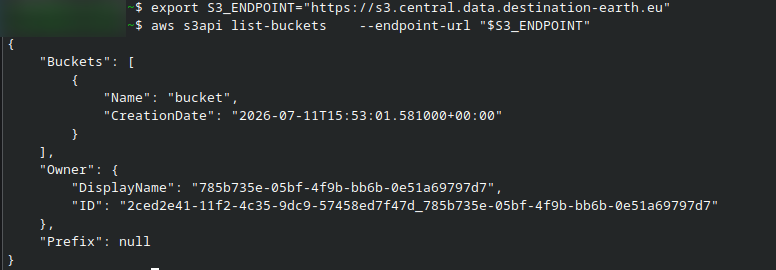
Listing the existing buckets.
The command should return the buckets available to the authenticated OpenStack project. If it returns AccessDenied, a signature error, or a connection error, correct the endpoint and credentials before creating the bucket.
Note
The bucket called bucket shown here was created in Cyberduck article, on standalone S3 object service.
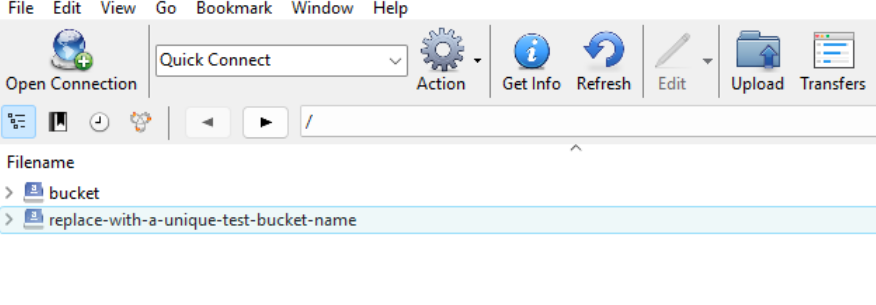
Cyberduck shows the situation through UI
Create an Object Lock-enabled bucket
Object Lock must be enabled when the bucket is created on the Ceph S3 service. Do not create an ordinary bucket and assume that the commands below can convert it later.
Create the bucket:
aws s3api create-bucket \
   --bucket "$BUCKET" \
   --object-lock-enabled-for-bucket \
   --endpoint-url "$S3_ENDPOINT"
The command normally produces no output when it succeeds.
Check that versioning is enabled:
aws s3api get-bucket-versioning \
   --bucket "$BUCKET" \
   --endpoint-url "$S3_ENDPOINT"
The output should contain:
{
    "Status": "Enabled"
}
Check the Object Lock status:
aws s3api get-object-lock-configuration \
   --bucket "$BUCKET" \
   --endpoint-url "$S3_ENDPOINT"
The output should show that ObjectLockEnabled is set to Enabled. A default retention rule is not present until you configure one.
Important
Once Object Lock is enabled for the bucket, treat it as a permanent bucket capability. Removing the default retention rule does not remove Object Lock or versioning from the bucket.
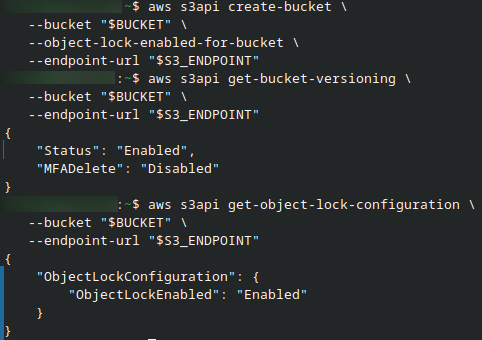
The three previous operations shown in one screenshot.
Configure default retention
A default retention rule automatically protects each new object version for a specified number of days or years.
Start with a short GOVERNANCE retention period on a disposable test bucket. Create object-lock-default.json:
cat > object-lock-default.json <<'EOF'
{
  "ObjectLockEnabled": "Enabled",
  "Rule": {
    "DefaultRetention": {
      "Mode": "GOVERNANCE",
      "Days": 1
    }
  }
}
EOF
Validate the JSON:
python3 -m json.tool object-lock-default.json > /dev/null
Apply the configuration:
aws s3api put-object-lock-configuration \
   --bucket "$BUCKET" \
   --object-lock-configuration file://object-lock-default.json \
   --endpoint-url "$S3_ENDPOINT"
Verify the active rule:
aws s3api get-object-lock-configuration \
   --bucket "$BUCKET" \
   --endpoint-url "$S3_ENDPOINT"
The result should contain a default retention mode of GOVERNANCE and a period of one day.
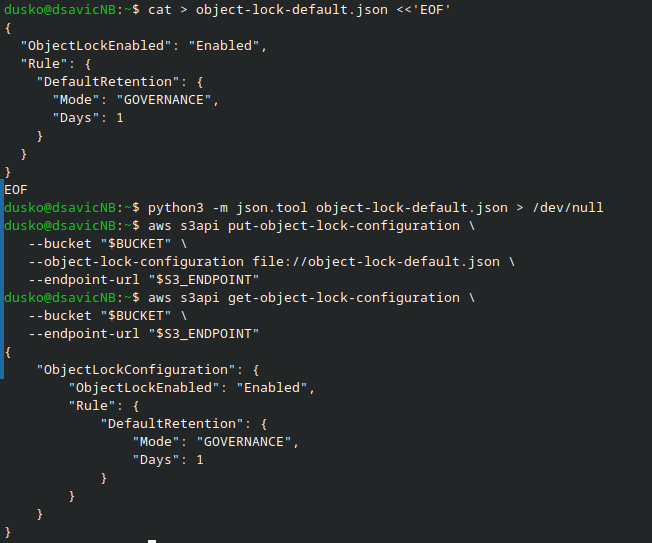
Create json file, let python execute it, show configuration.
To use COMPLIANCE mode after testing, change:
"Mode": "GOVERNANCE"
to:
"Mode": "COMPLIANCE"
Set Days or Years to the required retention period. Do not include both in the same rule.
Changing the bucket rule controls versions uploaded after the change. It does not shorten, extend, or otherwise modify the retention already assigned to existing versions.
Upload and inspect a protected object
Create a small test file:
printf 'Object Lock test\n' > object-lock-test.txt
Upload it:
aws s3 cp \
   object-lock-test.txt \
   "s3://$BUCKET/object-lock-test.txt" \
   --endpoint-url "$S3_ENDPOINT"
Because the bucket has versioning and default retention enabled, the uploaded object receives a version ID and a retention date.
List the versions stored under the test key:
aws s3api list-object-versions \
   --bucket "$BUCKET" \
   --prefix "object-lock-test.txt" \
   --endpoint-url "$S3_ENDPOINT"
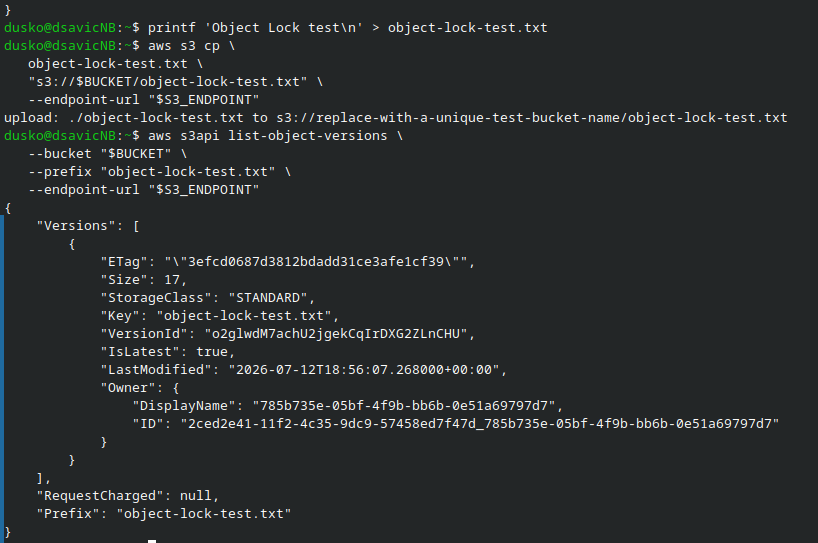
Create text file, copy it to S3 storage, list it from there.
Store the current version ID in a shell variable:
VERSION_ID=$(
   aws s3api list-object-versions \
      --bucket "$BUCKET" \
      --prefix "object-lock-test.txt" \
      --query 'Versions[?IsLatest].VersionId | [0]' \
      --output text \
      --endpoint-url "$S3_ENDPOINT"
)
Display it:
printf '%s\n' "$VERSION_ID"
Check the retention assigned to that version:
aws s3api get-object-retention \
   --bucket "$BUCKET" \
   --key "object-lock-test.txt" \
   --version-id "$VERSION_ID" \
   --endpoint-url "$S3_ENDPOINT"
The output should show the retention mode and the exact RetainUntilDate calculated when the object version was uploaded.
Store current version ID, display it locally and check retention assigned to that version.
Test deletion protection
To test Object Lock, attempt to delete the specific protected version:
aws s3api delete-object \
   --bucket "$BUCKET" \
   --key "object-lock-test.txt" \
   --version-id "$VERSION_ID" \
   --endpoint-url "$S3_ENDPOINT"
The request should fail with AccessDenied or another response indicating that deletion is forbidden by Object Lock.

Cannot delete locked object.
Do not test retention by omitting --version-id. In a version-enabled bucket, a delete request without a version ID normally creates a delete marker. The marker can hide the object from ordinary listings, but it does not permanently delete the locked version.
Uploading another file to the same key also does not replace the protected version. It creates a new version, while the older version remains stored with its original retention settings.
Apply retention to an individual object version
Use an individual retention configuration when one object version needs a different retention date from the bucket default, or when a version was uploaded while no default rule was active.
Set the required date in UTC:
export RETAIN_UNTIL="2030-01-01T00:00:00Z"
Apply GOVERNANCE retention to the selected version:
aws s3api put-object-retention \
   --bucket "$BUCKET" \
   --key "object-lock-test.txt" \
   --version-id "$VERSION_ID" \
   --retention "Mode=GOVERNANCE,RetainUntilDate=$RETAIN_UNTIL" \
   --endpoint-url "$S3_ENDPOINT"
Verify it:
aws s3api get-object-retention \
   --bucket "$BUCKET" \
   --key "object-lock-test.txt" \
   --version-id "$VERSION_ID" \
   --endpoint-url "$S3_ENDPOINT"
An explicit per-version retention setting takes precedence over the bucket’s default rule for that version.
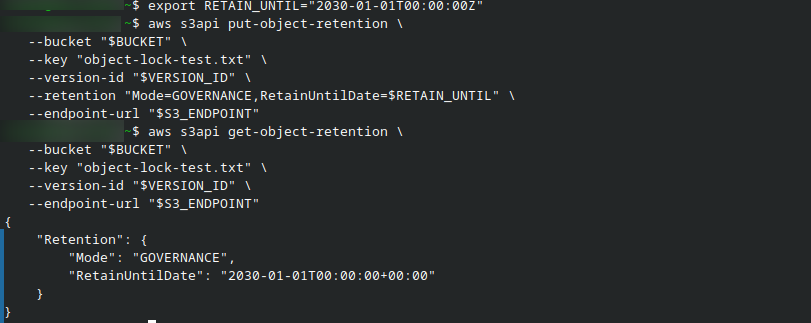
Apply retention to an individual object version.
Do not attempt to move a COMPLIANCE retention date backwards. A Compliance retention period can be extended, but it cannot be shortened before the currently configured date.
Apply and remove a legal hold
A legal hold protects one object version without specifying an expiry date. It remains active until an authorized user removes it and is independent of any retention period assigned to that version.
Enable a legal hold:
aws s3api put-object-legal-hold \
   --bucket "$BUCKET" \
   --key "object-lock-test.txt" \
   --version-id "$VERSION_ID" \
   --legal-hold Status=ON \
   --endpoint-url "$S3_ENDPOINT"
Check its status:
aws s3api get-object-legal-hold \
   --bucket "$BUCKET" \
   --key "object-lock-test.txt" \
   --version-id "$VERSION_ID" \
   --endpoint-url "$S3_ENDPOINT"
The output should contain:
{
    "LegalHold": {
        "Status": "ON"
    }
}
Remove the legal hold when it is no longer required:
aws s3api put-object-legal-hold \
   --bucket "$BUCKET" \
   --key "object-lock-test.txt" \
   --version-id "$VERSION_ID" \
   --legal-hold Status=OFF \
   --endpoint-url "$S3_ENDPOINT"
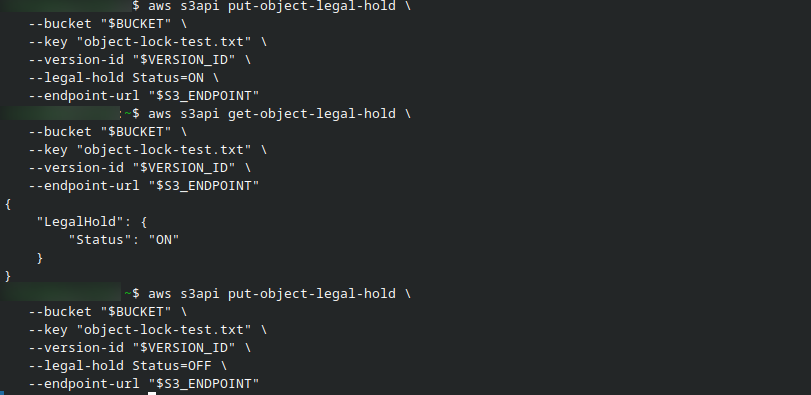
Apply and remove a legal hold.
Removing a legal hold does not remove an active retention period. The version remains protected until its retention date expires unless valid Governance bypass is used.
Bypass Governance retention
Governance mode permits an authorized administrator to bypass retention. The credentials must have the s3:BypassGovernanceRetention permission, and the delete request must explicitly request the bypass.
Use this operation only when permanent deletion is intentional:
aws s3api delete-object \
   --bucket "$BUCKET" \
   --key "object-lock-test.txt" \
   --version-id "$VERSION_ID" \
   --bypass-governance-retention \
   --endpoint-url "$S3_ENDPOINT"
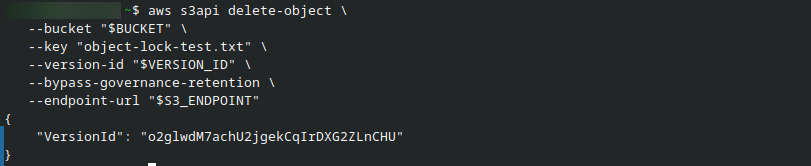
Bypass Governance retention.
The command succeeds only when the credentials have permission to bypass Governance retention. The output returns the ID of the object version that was permanently deleted:
{
    "VersionId": "o2glwdM7achU2jgekCqIrDXG2ZLnCHU"
}
Because the request specifies --version-id, it deletes that exact version rather than creating a delete marker. The same bypass cannot remove an object protected by COMPLIANCE retention or an active legal hold.
The command must not bypass a legal hold. Remove the legal hold separately before attempting permanent deletion.
Do not assume that ordinary bucket read/write access includes the right to bypass retention. Support for granting Object Lock administration actions through cross-project bucket policies can depend on the deployed Ceph version and service configuration. Keep retention administration with the bucket owner unless the required permissions have been tested and approved for the environment.
Remove the default retention rule
You can stop applying default retention to newly uploaded versions while leaving Object Lock enabled for the bucket.
Create object-lock-enabled.json:
cat > object-lock-enabled.json <<'EOF'
{
  "ObjectLockEnabled": "Enabled"
}
EOF
Apply it:
aws s3api put-object-lock-configuration \
   --bucket "$BUCKET" \
   --object-lock-configuration file://object-lock-enabled.json \
   --endpoint-url "$S3_ENDPOINT"
Verify the result:
aws s3api get-object-lock-configuration \
   --bucket "$BUCKET" \
   --endpoint-url "$S3_ENDPOINT"
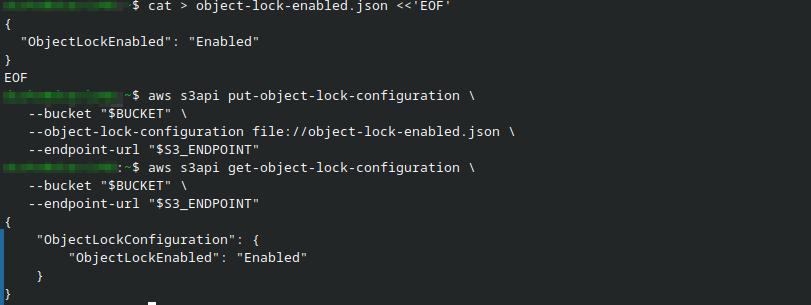
Remove the default retention rule.
The update succeeds without producing output. Verify the configuration:
aws s3api get-object-lock-configuration \
   --bucket "$BUCKET" \
   --endpoint-url "$S3_ENDPOINT"
The result contains ObjectLockEnabled but no Rule:
{
    "ObjectLockConfiguration": {
        "ObjectLockEnabled": "Enabled"
    }
}
Object Lock remains enabled for the bucket, but newly uploaded object versions no longer receive a default retention period. Existing retention settings and legal holds remain unchanged.
Removing the default rule affects only new uploads. Existing object versions keep their retention dates and legal holds.
Delete objects and the bucket after retention expires
After the retention date has passed and no legal hold remains, permanently delete a version by specifying its version ID:
aws s3api delete-object \
   --bucket "$BUCKET" \
   --key "object-lock-test.txt" \
   --version-id "$VERSION_ID" \
   --endpoint-url "$S3_ENDPOINT"
A version-enabled bucket may also contain other object versions and delete markers. The bucket cannot be deleted until all remaining versions and delete markers have been removed.
Follow S3 bucket object versioning to list versions and delete markers, recover hidden objects, and empty a version-enabled bucket safely.
Troubleshooting
InvalidBucketState when applying Object Lock configuration – The bucket was probably created without
--object-lock-enabled-for-bucket. Create a new Object Lock-enabled bucket and copy the required objects into it.The uploaded object has no retention information – Confirm that the default rule was applied before the object version was uploaded. Check the correct version ID, because each version has its own lock metadata.
Deleting the object succeeds but the data still exists – A delete request without
--version-idcreated a delete marker. List the versions and retrieve or permanently delete the required version explicitly.Permanent deletion returns AccessDenied – The version still has active Governance or Compliance retention, an active legal hold, or the credentials do not have permission to delete that version.
Governance bypass is refused – The request must include
--bypass-governance-retentionand the credentials must have the corresponding permission. The bypass does not apply to Compliance mode or to an active legal hold.Uploading to the same key succeeds – This is expected. Object Lock prevents permanent deletion or replacement of the protected version, but versioning allows a new version to be created under the same key.
Object Lock commands return NotImplemented or an unsupported-operation error – Stop the procedure and contact support for the affected S3 endpoint. Do not rely on Object Lock until the complete create, retain, inspect, and delete test has succeeded.
What To Do Next
Manage and recover object versions – See S3 bucket object versioning.
Share a bucket with another OpenStack project – See Sharing S3 buckets between OpenStack projects using bucket policies on Destination Earth.
Combine sharing, transfers, versioning, and backup – See S3 data-sharing and backup scenarios.
Browse and transfer S3 objects graphically – See Using Cyberduck with S3-compatible object storage on Destination Earth.