Building a Zarr cube with a pipeline
Note
Download the executable 07_zarr_cube_pipeline.ipynb to run this tutorial in JupyterLab.
A cube is what most downstream work wants: one store, one grid, a time axis, and no need to know which file each slice came from. This tutorial builds one from several MSG SEVIRI granules, in the order the work actually goes: read, crop, select the variables worth keeping, put them on a regular grid, and write.
Then it writes the same steps to a YAML workflow file, checks the file, and shows what the workflow would do without running it (a dry run), because a pipeline you can hand to the command line is easier to schedule than a notebook.
Before running this notebook, complete the shared setup in Tutorials.
Prerequisites
No. 1 Input data
The notebook reads these products from the public demo bucket of the DestinE Data Lake, without an account or credentials:
Three MSG SEVIRI native granules from 26 June 2026
To use your own files instead, change MSG_PREFIX and the three file
names in msg_files and follow Prepare data access for DEFAIR. For local files, that guide also explains the workflow change.
Set up the notebook
# Environment provenance: record the exact interpreter and package versions
# before any third-party import, so even an import failure leaves a usable log.
import sys
from importlib.metadata import PackageNotFoundError, version

print(f"python {sys.version.split()[0]}")
for pkg in ("defair", "defair-data", "defair-ops", "xarray", "zarr", "dask"):
    try:
        print(f"{pkg} {version(pkg)}")
    except PackageNotFoundError:
        print(f"{pkg} NOT INSTALLED")
python 3.13.12
defair 0.4.3
defair-data 0.4.3
defair-ops 0.4.3
xarray 2025.11.0
zarr 3.4.0
dask 2025.3.0
import time
from pathlib import Path

import numpy as np
import xarray as xr

from defair_data.core import Dataset
from defair_data.dask_manager import close_dask_client
from defair.logging import setup_logging
from defair.plugin_manager import load_source

# Readers log every step at DEBUG. WARNING keeps this notebook's output to what the
# pipeline prints, and is the level to raise when a step does something unexpected.
setup_logging(log_level="WARNING")

import matplotlib.pyplot as plt

try:
    import cartopy.crs as ccrs
    import cartopy.feature as cfeature

    HAS_CARTOPY = True
except ImportError:
    HAS_CARTOPY = False
    print("cartopy not installed, maps will be drawn without coastlines")

OUTPUT_DIR = Path("output")
OUTPUT_DIR.mkdir(exist_ok=True)
The input
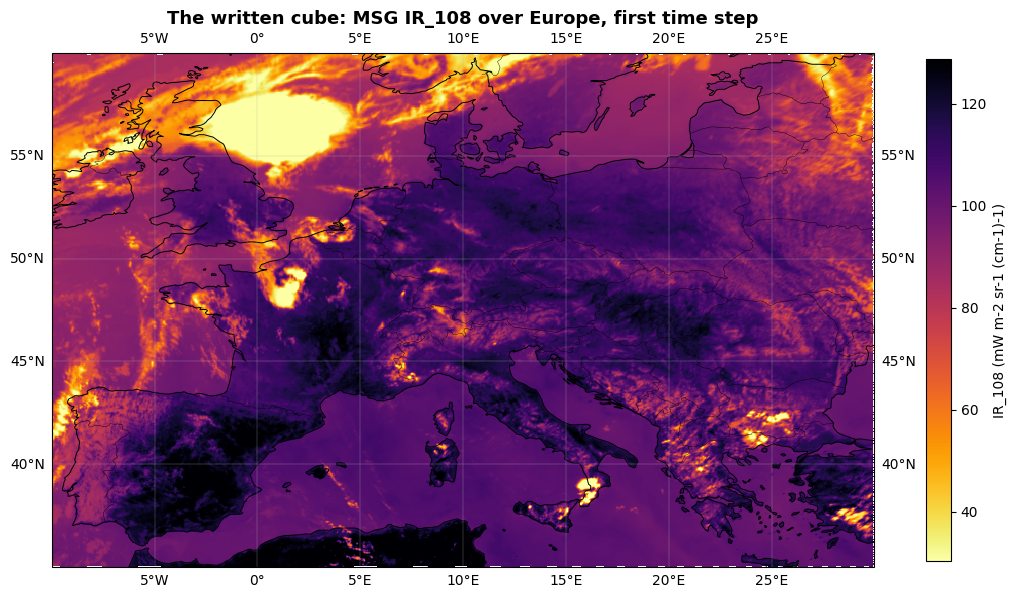
Three MSG repeat cycles of 26 June 2026. Each is a full disc; the pipeline below keeps a European window of one channel, which is what makes the result a cube rather than a pile of discs.
# The public Data Lake demo bucket, which needs no credentials.
PUBLIC_S3 = {"endpoint_url": "https://s3.central.data.destination-earth.eu", "anon": True}
s3 = load_source("s3", **PUBLIC_S3)
# The listing shows the MSG granules the folder holds. The three repeat cycles read below
# are pinned by name so the cube is the same every time.
MSG_PREFIX = "s3://datalake-demo-data/defair-notebook-data/msg-seviri-l15"
available = sorted(s3.list(MSG_PREFIX, pattern="MSG3-SEVI-MSG15-*"))
msg_files = [
    f"{MSG_PREFIX}/MSG3-SEVI-MSG15-0100-NA-20260626111243.441000000Z-NA.nat",
    f"{MSG_PREFIX}/MSG3-SEVI-MSG15-0100-NA-20260626112743.658000000Z-NA.nat",
    f"{MSG_PREFIX}/MSG3-SEVI-MSG15-0100-NA-20260626125743.160000000Z-NA.nat",
]
missing = [path for path in msg_files if path not in available]
assert not missing, f"granules not found under {MSG_PREFIX}: {missing}"
for path in msg_files:
    print(path.split("/")[-1])

EUROPE = {"lat_min": 35.0, "lat_max": 60.0, "lon_min": -10.0, "lon_max": 30.0}
OUTPUT_ZARR = OUTPUT_DIR / "msg_europe_cube.zarr"
MSG3-SEVI-MSG15-0100-NA-20260626111243.441000000Z-NA.nat
MSG3-SEVI-MSG15-0100-NA-20260626112743.658000000Z-NA.nat
MSG3-SEVI-MSG15-0100-NA-20260626125743.160000000Z-NA.nat
The pipeline
Three transformations and a write, chained. Opening each granule reads
its header; every step after that is lazy, so no channel value is read
until to_file needs it.
The content filter is the step that narrows a product with many
variables. Here the read has already asked for one channel, so it keeps
that channel and geostationary, the grid-mapping variable the
channel’s grid_mapping attribute points at: dropping that would
leave the channel describing a projection no longer in the dataset.
import shutil

if OUTPUT_ZARR.exists():
    shutil.rmtree(OUTPUT_ZARR)

start = time.perf_counter()
cube = (
    Dataset.from_source(
        msg_files, reader="msg15nat", source="s3", source_kwargs=PUBLIC_S3,
        use_channel_names=True, channels=["IR_108"],
    )
    .transform("content_filter", include_vars=["IR_108"])
    .transform("spatial_filter", **EUROPE)
    .transform("reprojection", target="EPSG:4326", resolution=0.05, resampling="bilinear")
)
print(f"pipeline built lazily: {dict(cube.data.sizes)}")

cube.to_file(str(OUTPUT_ZARR), writer="zarrv2", mode="w", consolidated=True)
print(f"written in {time.perf_counter() - start:.1f} s to {OUTPUT_ZARR}")
pipeline built lazily: {'time': 3, 'lon': 800, 'lat': 500, 'bnds': 2}
written in 5.6 s to output/msg_europe_cube.zarr
Output dataset
Reopen the store and look at it as a consumer would: the shape, the chunking on disk, and the provenance DEFAIR recorded while building it.
written = xr.open_zarr(str(OUTPUT_ZARR), consolidated=True)
print(written)
print(f"\nchunking on disk: {written['IR_108'].encoding.get('chunks')}")
<xarray.Dataset> Size: 5MB
Dimensions:      (time: 3, lat: 500, lon: 800, bnds: 2)
Coordinates:
  * time         (time) datetime64[ns] 24B 2026-06-26T11:00:00 ... 2026-06-26...
  * lat          (lat) float64 4kB 59.98 59.92 59.88 59.83 ... 35.12 35.08 35.02
  * lon          (lon) float64 6kB -9.975 -9.925 -9.875 ... 29.88 29.93 29.98
    spatial_ref  int64 8B ...
    time_bnds    (time, bnds) datetime64[ns] 48B dask.array<chunksize=(1, 2), meta=np.ndarray>
Dimensions without coordinates: bnds
Data variables:
    IR_108       (time, lat, lon) float32 5MB dask.array<chunksize=(1, 500, 512), meta=np.ndarray>
Attributes: (12/23)
    Conventions:                     CF-1.13
    title:                           MSG SEVIRI Level 1.5 Native Format Data
    institution:                     EUMETSAT
    source:                          MSG SEVIRI Native Format
    sensor:                          SEVIRI
    format:                          MSG 1.5 Native
    ...                              ...
    source_granules:                 ['s3://datalake-demo-data/defair-noteboo...
    history:                         2026-10-04T18:44:36.636678+00:00: Read o...
    crs:                             EPSG:4326
    spatial_ref:                     GEOGCRS["WGS 84",ENSEMBLE["World Geodeti...
    defair_cdm:                      {"schema_version":3,"reader":"msg15","pr...
    date_created:                    2026-10-04T18:44:41.093686+00:00

chunking on disk: (1, 500, 512)
for line in written.attrs.get("history", "(none)").splitlines():
    print(line[:140])
2026-10-04T18:44:36.636678+00:00: Read operation [DEFAIR v0.4.3:MSG15NativeReaderPlugin, channels=['IR_108'], source='s3://datalake-demo-dat
2026-10-04T18:44:38.850124+00:00: Transform operation [DEFAIR v0.4.3:ContentFilterPlugin, include_vars=['IR_108'], exclude_vars=None, squeez
2026-10-04T18:44:38.906736+00:00: Transform operation [DEFAIR v0.4.3:SpatialFilterPlugin, lat_min=35.0, lat_max=60.0, lon_min=-10.0, lon_max
2026-10-04T18:44:39.657682+00:00: Transform operation [DEFAIR v0.4.3:Reprojection, target='EPSG:4326', resampling='bilinear', backend=None,
2026-10-04T18:44:41.093636+00:00: Write operation [DEFAIR v0.4.3:ZarrV2Writer, mode='w', consolidated=True, auto_chunk=True, chunk_size_mb=1
# The cube is now an ordinary Zarr store on a regular grid, so anything that reads
# xarray can draw it. This is the first time step of the channel the pipeline kept.
field = written["IR_108"].isel(time=0).compute()
values = np.asarray(field.values, dtype=float)
finite = values[np.isfinite(values)]
vmin, vmax = np.percentile(finite, [2, 98])

figure = plt.figure(figsize=(11, 7))
axis = plt.axes(projection=ccrs.PlateCarree()) if HAS_CARTOPY else plt.axes()
mesh_kwargs = {"transform": ccrs.PlateCarree()} if HAS_CARTOPY else {}
mesh = axis.pcolormesh(
    field["lon"].values, field["lat"].values, values,
    cmap="inferno_r", vmin=vmin, vmax=vmax, shading="auto", **mesh_kwargs,
)
if HAS_CARTOPY:
    axis.coastlines(linewidth=0.7)
    axis.add_feature(cfeature.BORDERS, linewidth=0.3)
    axis.gridlines(draw_labels=True, linewidth=0.2)
axis.set_title("The written cube: MSG IR_108 over Europe, first time step", fontsize=13, fontweight="bold")
units = written["IR_108"].attrs.get("units", "")
figure.colorbar(mesh, ax=axis, label=f"IR_108 ({units})" if units else "IR_108", shrink=0.75)
plt.tight_layout()
plt.show()
Define the pipeline in YAML
The Python example implements the processing pipeline directly. The same steps can be defined in a YAML workflow file and run with the DEFAIR command-line tool. You can schedule the workflow and store the YAML file in a repository alongside the code that uses its output.
The Python example has already processed the satellite data and written
output/msg_europe_cube.zarr. Running the YAML workflow would repeat
the same work and create a second dataset. The final code block therefore
uses --dry-run to check the workflow configuration and display its
execution plan. This avoids another round of data reads and processing,
saving time, CPU work and disk space.
To run the YAML workflow in full, remove "--dry-run" from the argument
list passed to subprocess.run. DEFAIR will then process the data and
write output/msg_europe_cube_from_yaml.zarr.
import subprocess
import yaml

from defair.models.workflow import WorkflowConfig

workflow = {
    "name": "MSG Europe cube",
    "description": "Read MSG SEVIRI, crop to Europe, keep one channel, reproject and write Zarr",
    "version": "1.0",
    "inputs": [
        {
            "reader": {"name": "msg15nat", "use_channel_names": True, "channels": ["IR_108"]},
            "source": {"fs_type": "s3", "path": msg_files, **PUBLIC_S3},
        }
    ],
    "transformations": [
        {"operation": "content_filter", "include_vars": ["IR_108"]},
        {"operation": "spatial_filter", **EUROPE},
        {"operation": "reprojection", "target": "EPSG:4326", "resolution": 0.05, "resampling": "bilinear"},
    ],
    "outputs": [
        {
            "writer": "zarrv2",
            "path": str(OUTPUT_DIR / "msg_europe_cube_from_yaml.zarr"),
            "mode": "w",
            "consolidated": True,
        }
    ],
}

print(yaml.dump(workflow, default_flow_style=False, sort_keys=False))
name: MSG Europe cube
description: Read MSG SEVIRI, crop to Europe, keep one channel, reproject and write
  Zarr
version: '1.0'
inputs:
- reader:
    name: msg15nat
    use_channel_names: true
    channels:
    - IR_108
  source:
    fs_type: s3
    path:
    - s3://datalake-demo-data/defair-notebook-data/msg-seviri-l15/MSG3-SEVI-MSG15-0100-NA-20260626111243.441000000Z-NA.nat
    - s3://datalake-demo-data/defair-notebook-data/msg-seviri-l15/MSG3-SEVI-MSG15-0100-NA-20260626112743.658000000Z-NA.nat
    - s3://datalake-demo-data/defair-notebook-data/msg-seviri-l15/MSG3-SEVI-MSG15-0100-NA-20260626125743.160000000Z-NA.nat
    endpoint_url: https://s3.central.data.destination-earth.eu
    anon: true
transformations:
- operation: content_filter
  include_vars:
  - IR_108
- operation: spatial_filter
  lat_min: 35.0
  lat_max: 60.0
  lon_min: -10.0
  lon_max: 30.0
- operation: reprojection
  target: EPSG:4326
  resolution: 0.05
  resampling: bilinear
outputs:
- writer: zarrv2
  path: output/msg_europe_cube_from_yaml.zarr
  mode: w
  consolidated: true
# The workflow model is the same one the command line validates against, so checking it
# here catches a bad file before it reaches a scheduler.
WorkflowConfig.model_validate(workflow)
print("workflow is valid against the public model")

workflow_file = OUTPUT_DIR / "msg_europe_cube.yaml"
workflow_file.write_text(yaml.dump(workflow, default_flow_style=False, sort_keys=False))
print(f"written to {workflow_file}")
workflow is valid against the public model
written to output/msg_europe_cube.yaml
# A dry run prints the execution plan without reading any data, which is the cheapest way to
# see what a workflow file will do. Running the module through this notebook's own
# interpreter keeps it working wherever DEFAIR is installed, rather than only inside a
# checkout with uv.
result = subprocess.run(
    [sys.executable, "-m", "defair", "run", "--config", str(workflow_file.resolve()), "--dry-run"],
    capture_output=True,
    text=True,
    check=True,
)
print(result.stdout or result.stderr)
MSG Europe cube
Read MSG SEVIRI, crop to Europe, keep one channel, reproject and write Zarr

                                                                                             1. Input Stage
┏━━━━━┳━━━━━━━━━┳━━━━━━━━━━┳━━━━━━━━━━━━━━━━━━━━━━━━━━━━━━━━━━━━━━━━━━━━━━━━━━━━━━━━━━━━━━━━━━━━━━━━━━━━━━━━━━━━━━━━━━━━┳━━━━━━━━━━━━━━━━━━━━━━━━━━━━━━━━━━━━━━━━━━━━━━━━━━━━━━━━━━━━━━━━━━━━━━━━━━━━━━┓
┃ #   ┃ ID      ┃ Reader   ┃ Source                                                                                     ┃ Configuration                                                                ┃
┡━━━━━╇━━━━━━━━━╇━━━━━━━━━━╇━━━━━━━━━━━━━━━━━━━━━━━━━━━━━━━━━━━━━━━━━━━━━━━━━━━━━━━━━━━━━━━━━━━━━━━━━━━━━━━━━━━━━━━━━━━━╇━━━━━━━━━━━━━━━━━━━━━━━━━━━━━━━━━━━━━━━━━━━━━━━━━━━━━━━━━━━━━━━━━━━━━━━━━━━━━━┩
│ 1   │ input_0 │ msg15nat │ s3://datalake-demo-data/defair-notebook-data/msg-seviri-l15/MSG3-SEVI-MSG15-0100-NA-20260… │ Reader: use_channel_names=True, channels=['IR_108']                          │
│     │         │          │ s3://datalake-demo-data/defair-notebook-data/msg-seviri-l15/MSG3-SEVI-MSG15-0100-NA-20260… │ Source: endpoint_url=https://s3.central.data.destination-earth.eu, anon=True │
│     │         │          │ s3://datalake-demo-data/defair-notebook-data/msg-seviri-l15/MSG3-SEVI-MSG15-0100-NA-20260… │                                                                              │
└─────┴─────────┴──────────┴────────────────────────────────────────────────────────────────────────────────────────────┴──────────────────────────────────────────────────────────────────────────────┘

                                  2. Transformation Stage
┏━━━━━┳━━━━━━━━━━━━━━━━┳━━━━━━━━━┳━━━━━━━━━━━━━━━━━━━━━━━━━━━━━━━━━━━━━━━━━━━━━━━━━━━━━━━━━┓
┃ #   ┃ Operation      ┃ Routing ┃ Parameters                                              ┃
┡━━━━━╇━━━━━━━━━━━━━━━━╇━━━━━━━━━╇━━━━━━━━━━━━━━━━━━━━━━━━━━━━━━━━━━━━━━━━━━━━━━━━━━━━━━━━━┩
│ 1   │ content_filter │ -       │ include_vars=['IR_108']                                 │
│ 2   │ spatial_filter │ -       │ lat_min=35.0, lat_max=60.0, lon_min=-10.0, lon_max=30.0 │
│ 3   │ reprojection   │ -       │ target=EPSG:4326, resolution=0.05, resampling=bilinear  │
└─────┴────────────────┴─────────┴─────────────────────────────────────────────────────────┘

                                      3. Output Stage
┏━━━━━┳━━━━━━━━┳━━━━━━━━━━━━━━━━━━━━━━━━━━━━━━━━━━━━━━━┳━━━━━━━━━━━━━━━━━━━━━━━━━━━━━━━━━━━┓
┃ #   ┃ Writer ┃ Destination                           ┃ Configuration                     ┃
┡━━━━━╇━━━━━━━━╇━━━━━━━━━━━━━━━━━━━━━━━━━━━━━━━━━━━━━━━╇━━━━━━━━━━━━━━━━━━━━━━━━━━━━━━━━━━━┩
│ 1   │ zarrv2 │ output/msg_europe_cube_from_yaml.zarr │ Writer: mode=w, consolidated=True │
└─────┴────────┴───────────────────────────────────────┴───────────────────────────────────┘
What to do next
See Run workflows for more complete workflow files, including multi-source ones. The collocation tutorial builds a cube from two instruments rather than one. See Stream multiple inputs to Zarr for streaming, which is how this pipeline scales past the memory of the machine running it.
close_dask_client()